
Independent driving: sat nav and traffic signs
Following a sat nav and following signs, reading the screen, and what to do when you go the wrong way. Each step matches the numbers on the pictures, and there is a quiz at the end, with sat nav screens to read.
For part of the test, nobody tells you where to turn. You find the way yourself, while driving as safely as the rest of the time. It shows you can make your own decisions, as you will once you pass.
How it works on the test
You'll drive independently for 20 to 35 minutes.
- You follow
directions from a sat nav
,traffic signs
, ora combination of both
.The examiner will tell you which you have to follow.
They'll set the sat nav up for you. You cannot use your own sat nav.
The examiner will not give you a fault for taking a wrong turning.
They'll help you get back on the route if you do.
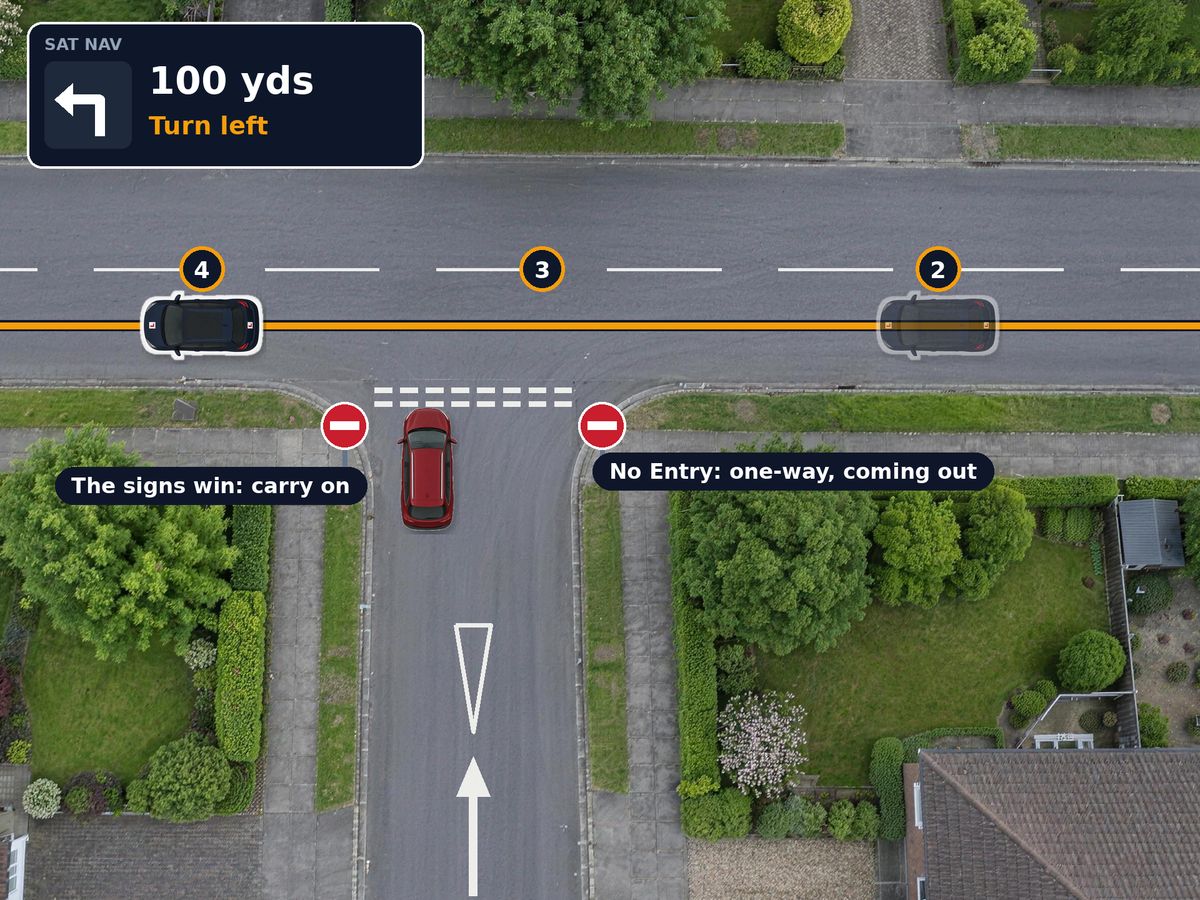
When the sat nav and the road disagree
The sat nav says turn left
Check your mirrors and start to plan the turn, but do not signal until you are sure you can take it.
No Entry signs on that road
It is one-way, coming out towards you. Signs and road markings always come before the sat nav.
No signal, carry straight on
Do not stop, swerve or reverse to put it right. Drive on normally and safely.
The sat nav finds a new route
It will soon give you a new instruction. On your test, a wrong or missed turning is not a fault in itself.
Following traffic signs
The examiner names a place, such as the hospital, and you follow the signs to it.
Find your place early
Look for the name you were given on each sign. The arms on a map-type sign show where each exit goes.
Work out your exit and your lane
Here, Hospital is to the right, so take the right-hand lane for the roundabout unless markings say otherwise, and signal right.
Look for the next sign
After the junction, a sign or a route marker usually confirms you are on the right road.
Cannot see a sign?
If a sign is hidden, by trees for example, the examiner will give you directions until you can see the next one.
Gone the wrong way?
- Do not panic. A wrong turning is not a fault. The examiner or the sat nav will get you back on the route.
- Never put it right suddenly. Cutting across lanes, braking hard or stopping in the road are the things that do earn faults.
- Missed an exit at a roundabout? Go round again if it is safe, or take the next exit and let the sat nav reroute.
- Forgot where you were going? Ask the examiner. A reminder is not a fault.
- Keep driving well. Mirrors, signals, speed and position matter just as much while you are thinking about the way.
How to practise
- Use a sat nav in lessons and practice drives, set up before you move off, never while driving.
- Follow signs to somewhere new, such as a hospital, a station or the next town, without a sat nav.
- Drive roads you do not know. The routes used on the test are not published, so learn the skill rather than a route.
- Practise the busy bits: multi-lane roundabouts and junctions with lane arrows, where choosing your lane early matters most. See roundabouts and town driving.
Independent driving quiz
Ready when you are
- 10 questions
- About 3 minutes
- Answers explained
- Nothing saved
Questions people ask
How long is independent driving on the test?
GOV.UK says 20 to 35 minutes. You follow a sat nav, traffic signs, or a combination of both, and the examiner tells you which.
Is going the wrong way a fault?
No. The examiner will not give you a fault for taking a wrong turning, and will help you get back on the route. What matters is that you drive safely, so never make a sudden move to correct it.
Can I use my own sat nav?
No. The examiner sets up the sat nav for you, so you do not need to touch it.
Can I ask the examiner where to go?
Yes. If you are not sure of an instruction or forget where you are heading, ask. Needing a reminder is not a fault.
Signed in
You are already on Driving Test Hero
Signed in as . Your test, your matches and your email settings are on My swaps.
Go to My swapsFree · about a minute
Not ready for your test date?
You do not have to sit it unready. Most learners want an earlier test, so someone at your centre may well want yours, and a swap gives you their later date with no new fee. DVSA does it over the phone. Ready sooner? It works the other way too. We email you when a learner who could swap with you joins, and your email is never shown to anyone.
Already signed up? Sign in
One email to confirm, no password, and one click takes you off the list. How we handle your details.
No test booked yet? There is nothing to swap until you have one. Book on GOV.UK, then come back.